


What if I told you that a $29 product could be the secret to scaling your creator business faster and more sustainably than anything else?
What if I told you that a $29 product could be the secret to scaling your creator business faster and more sustainably than anything else?
Today, I’m breaking down why that price point works from both a psychological and strategic standpoint and how this strategy helps with scaling your creator business. I’ll also be sharing a 6-step framework for setting up your own $29 product, without overcomplicating it.
As always, if you’d prefer to watch instead of read, click the video below.
DISCLAIMER: Links included in this post might be affiliate links. If you purchase a product or service with the links that I provide I may receive a small commission. There is no additional charge to you! Thank you for supporting me so I can continue to provide you with free content each week on my blog and on my YouTube channel!
The $29 Product Framework: The Secret to Scaling Your Creator Business
First things first, why does a $29 digital product work so well at scaling your creator business?
If you’re a content creator who wants to start making money online, creating a digital product is one of the quickest ways to get there.
How do I know that? Well, not only have I coached hundreds of creators over the last six years, but I also have a working relationship with Stan Store and recently I was able to ask them to analyze the thousands of creators in their system to see what’s actually working right now.
Three things really stood out to me from our conversation:
- The most popular products people are making money with in their Stan Store are digital downloads. These can be e-books, guides, templates, etc. Digital downloads drive over 50% of the total GMV on Stan (DMV stands for Gross Merchandise Value). Basically, that just means that of the total amount of money that creators are making through Stan, over half of it comes from digital products.
- Of that 50% GMV, most of the products are priced between $5 and $30. That range tends to be the sweet spot. Why? Because they’re low-ticket enough to feel like an easy yes for someone to buy, but priced high enough to show value and actually convert for consistent sales.
- A Creator who has a digital download is more likely to start making money faster than one who doesn’t.
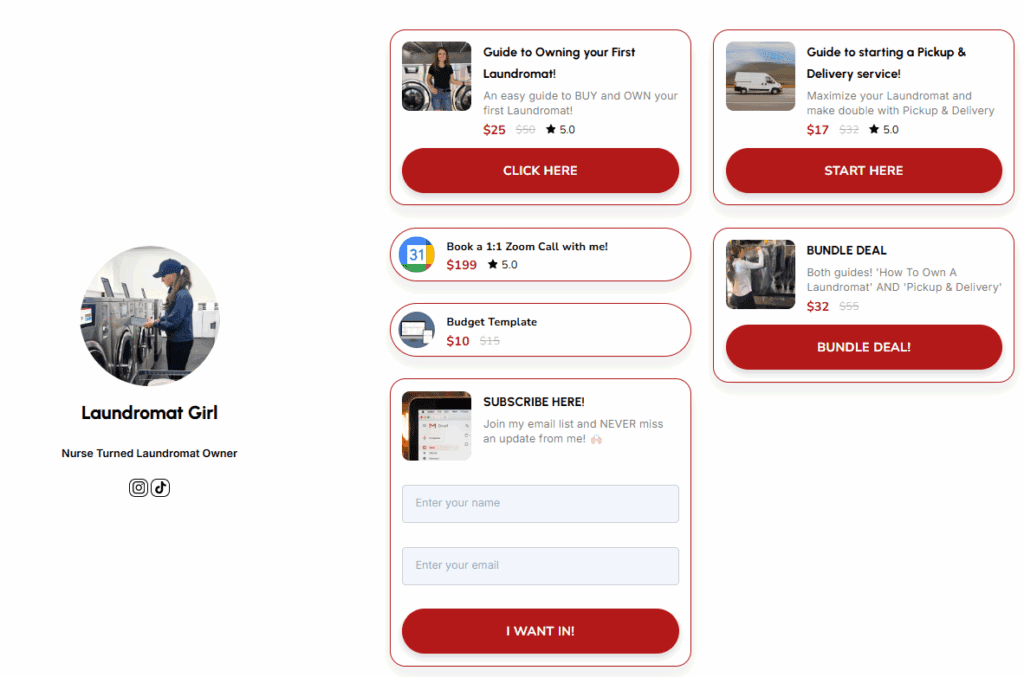
I think that Laundromat Girl is a unique example of this. She is crushing it right now with her creator business. She has multiple entry products that are priced in that $5-$30 range, with her most popular being a $25 guide to owning your first laundromat.
So, why $29?
Personally, I’m a fan of any product that ends in an odd number.
Whole dollar amounts like $20, $25, $27 and $29 can all be perceived differently by consumers. Prices ending in odd numbers (such as $25, $27 and $29) often feel more specific and intentional, which can signal to buyers that the price is set with care and may offer better value. While, round numbers (like $20 or $30) tend to feel more general.
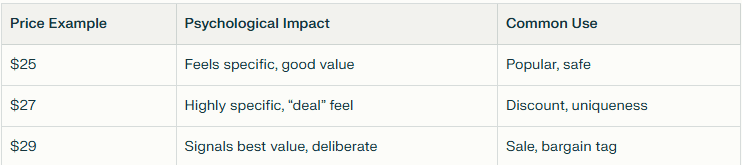
Again, finding that sweet spot, free and micro offers (anything under $10) are great, but they can have a low perceived value or be ignored if the title or marketing of the product feels too generic.
$29 sits at the upper end of Stan’s proven sweet spot (a price point that balances perceived value with low purchase friction. It feels like an intentional investment to the buyer, but it’s still affordable enough to encourage spontaneous purchases).
Now, I know that there’s no “perfect price”. There are many factors that go into pricing your products, like value, the market, perceived value, your niche neighbors, etc. But we’re going to take $29 and run with it for the rest of this framework.
How does a $29 digital product scale your creator business?
There are so many ways you can go about scaling your creator business using a $29 digital product. First, and this is the simplest way, as you grow your audience and consistently create content around your offer, you’ll start seeing passive sales come in.
This is exactly what so many creators on Stan Store are doing. They’re building their audience organically, posting content that naturally relates to their digital products, and earning six and even seven figures, all from products linked right in their bio.
Another way that you could use a $29 digital product to scale your business is by using it as an entry point for your audience, that then later upsells them a mid or high ticket offer. This is something that I currently do with my business. I have a $27 mini-course that later upsells a mid-tier offer, which then in turn, upsells a high-ticket offer.
Let me show you just how valuable this can be for scaling your creator business.
Let’s say that in one month, 100 people buy your $29 product. That’s $2,900 in revenue on its own. Amazing — but the real magic happens when you introduce email automation.
With just one simple email sequence that upsells buyers to a related offer, things scale quickly. If 15% of those customers purchase your mid-tier product — say a $397 course — that’s an additional $5,955. And if only 3% of your original buyers go on to purchase your high-ticket offer, such as a $997 group coaching program, that’s another $2,991.
Altogether, for every 100 people who enter your funnel, you’re not just earning $2,900… you’re bringing in more than $11,000 through an automated email system that runs without any extra manual work.
Of course, you still need to do the work upfront to build out all of these products (and maintain them), but once everything is set up, this is one way that you can genuinely generate money while you sleep.
Remember: most people won’t invest in your course or coaching right away. They need a low-ticket entry point first—a chance to get to know you, trust you, and see the value you offer.
If you want to dive deeper into funnels, make sure to watch the video where I walk you through setting up your first 5-figure funnel step by step.

The $29 Digital Product Framework For Scaling Your Creator Business in 6 Steps
Step 1: Identify a Micro Problem in Your Industry
Specificity sells—truly. Just look at Cami (Laundromat Girl). Her top-selling product isn’t a generic “how to start a business” guide. It’s a super-niche guide on owning your first laundromat… and that’s exactly why it works.
So start with your audience. What’s one tiny but meaningful problem they’re trying to solve? You’re not giving them the full transformation yet—you’re giving them that first, confidence-boosting win.
If their bigger goal is to grow on Instagram, what’s the starting point you can walk them through? Instead of teaching everything at once, maybe you create something like “How to Get 10k Views on Your Reels.”
Quick disclaimer: Make sure the solution you’re offering is actually worth the $29 price tag. For example, if your content is about making coffee, a guide that says “Save $5 by making this iced latte at home” probably isn’t enough value for someone to spend $29. You want your product to provide a win that feels meaningful and worth the investment.
Once you’ve narrowed down the micro problem, you can move on to the next step.
Step 2: Design Your Product Around a Quick-Win Transformation
Here’s the truth: people don’t want more information — they want a result. So your digital product should promise a transformation that feels simple and fast.
Think about it this way: “How to Grow on Instagram: The Ultimate Guide” sounds like a LOT to learn, especially for a $29 offer. But something like “Script 10 Reels in 10 Minutes — Each Designed to Hit 10K Views” feels doable, specific and exciting.
Your audience immediately understands what they’re going to get and how quickly they’ll see progress.
Another example: instead of creating a general “weight loss guide,” you could offer “The Ultimate Eating Out Cheat Sheet — Exact Meals to Order at 50 Popular Restaurants.”
Once you’ve defined that quick-win transformation, it becomes so much easier to put your product together.
Step 3: Package it Simply
When it comes to putting your digital product together, keep it simple. I create all of mine in Canva because it’s beginner-friendly, accessible, and you don’t need a design background to make something polished.
Here’s the basic structure I teach my students:
• Page one: Your title page.
• Page two: A brief “about you” or “about this guide” section.
• Page three and beyond: Deliver the transformation—this is where the real value lives.
Canva already has beautiful templates, so your focus should be on clarity, not decoration. Clean layouts almost always convert better because they help the reader move through the information with ease.
With your product packaged and ready to go, you’re officially prepped to launch it!

Step 4: Launch via Stan Store
Now that you’ve created your product, you need to add it to your Stan Store and add Stan Store to your link in bio. If you want to go through this together, watch this video (starting at 12:20). Otherwise, if you’re already familiar with Stan, add the product – choose ‘digital product’, make it a callout and set the price to $29. Then, put this product at the TOP of your store so it’s the first option that people see when they click your link in bio.
Stan Store is amazing. Period. I feel like I don’t need to say anything else, they are a tool I talk about all the time on this blog and on my YouTube Channel. If you’re not already using Stan Store, I highly, highly recommend them for content creators. You can learn more and sign up here.
Step 5: Market Smartly
You don’t need to create content that screams “buy, buy, buy.” Instead, focus on teaching why your micro-problem matters. Using our earlier example — The Ultimate Eating Out Cheat Sheet: Exact Meals to Order at 50 Popular Restaurants — here are some video ideas that naturally lead viewers to your offer:
- The #1 reason people give up when dieting
- 3 restaurant orders that look healthy but aren’t
- I lost weight while eating out every week — here’s how
- How to read a menu like a nutritionist so you can still eat out while losing weight
- What I ordered at [RESTAURANT] to stay on track with my weight loss goal (this could even be a signature series!)
Once your content is ready, include a simple CTA either in your video or caption. For example, “Comment CHEATSHEET and I’ll send you my Ultimate Eating Out Cheat Sheet.”
Verbal CTAs are extremely effective, but if you prefer not to say it out loud, captions work too. People are still reading captions, and using your keywords there can drive results.
If you want help creating content that hooks your audience and gets them to respond to your CTA, check out my guide 100 Hook Ideas to Capture Attention and Increase Views.
Step 6: DM Automations
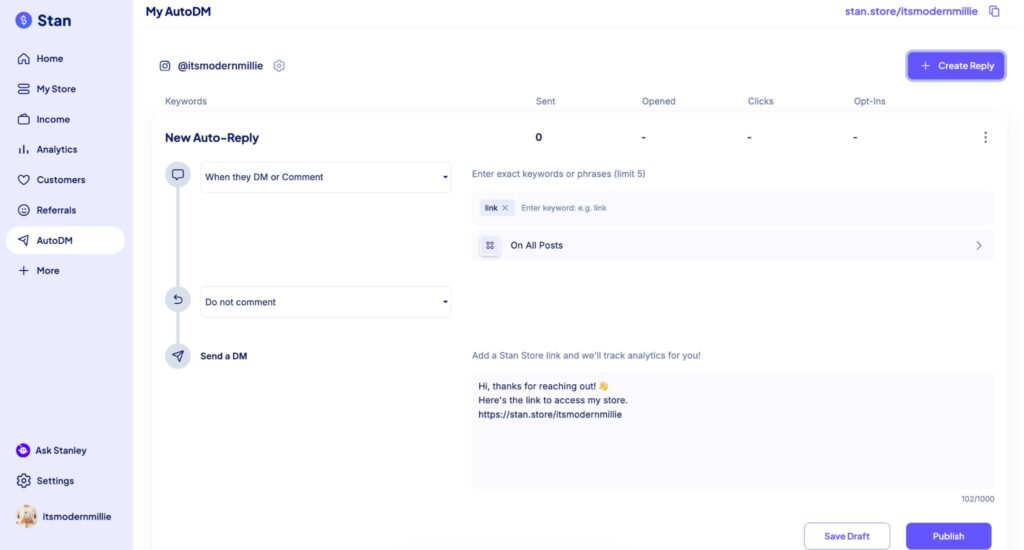
Step five is going to naturally segue us into step six which is DM Automations. I’ve given you a couple of examples now of a CTA that’s “Comment CHEATSHEET and I’ll send you a DM…” Now it’s time to create the automation.
Head back into your Stan Store and click on ‘AutoDM’. Make sure that you have a trigger set up so that every time someone comments a keyword, Stan Store DM’s them your guide! I have a full tutorial to help you set up your first DM automation which you can watch here.
So, what can you do right now? I want you to identify a micro problem in your industry and figure out what transformation you can offer to your audience to help them solve that problem. Comment your ideas down below or on this YouTube video so I can help you brainstorm.
Then, watch this video next to help you create and set up your digital product on Stan Store. Or you can read this post to help you grow on social media! Lastly, if you want to become a content creator in 2026, be sure to read this guide before you go.
As always, thank you so much for being here. Follow your joy and I’ll see you in the next one!





Be the first to comment