


From clicks to sales: the Instagram link in bio strategy that actually works.
DISCLAIMER: Links included in this post might be affiliate links. If you purchase a product or service with the links that I provide I may receive a small commission. There is no additional charge to you! Thank you for supporting me so I can continue to provide you with free content each week on my blog and on my YouTube channel!
Today I’m going to share an Instagram link in bio strategy that’s helped hundreds of creators hit 5- and even 6-figure months. We’ll walk through 7 simple steps so that by the end of this post, your link in bio will be set up to start making money.
If this is your first time on the blog, I’m Millie! I’m a content creator coach who helps new and aspiring creators grow online and start making money doing what they love. This guide is one of my favorites I’ve put together in a while because I’ve seen firsthand how powerful it is.
My students have used this exact Instagram link in bio strategy to start earning from their pages right away, and now, I’m so excited to share it with you.
As always if you’d rather watch instead of read, click the video below. Let’s get started.
Make 5-Figures With This Instagram Link In Bio Strategy
Step 1: Set up Your Link in Bio (With StanStore)
The first step in our Instagram link in bio strategy is to create a StanStore.
Stan has been my go-to tool for creators since I first started using it back in 2022 — and honestly, I instantly fell in love. Today, I use Stan as my Instagram link in bio tool, to sell digital products, and even to host a mini course. It’s become such an essential part of my business that I’ve been recommending it ever since.
I truly believe Stan is the best tool any creator can use to start making money online — and as we walk through these steps together, you’ll see exactly why. No other single platform makes it this easy to set up and scale your business.

To start your StanStore, create an account, choose a template that fits your brand, and upload your first product or digital offer, it’s that easy. To help, I’ve created a full StanStore tutorial that you can watch here.
And don’t worry, setting up your digital offer is our next step.
Step 2: Create a Free Offer
Yes, you read that right, we’re not selling anything just yet. We’re starting with a free offer because, when you place a free offer next to a paid offer, your chances of making a sale increase by 43%.
Stan actually ran a study analyzing over 65,000 creators’ Stan Stores, and one of their biggest findings was that having a free offer alongside your paid products significantly boosts conversions.
So, how do we do this?
Well for starters, I created some AI prompts to help keep this process as simple as possible. Here’s a prompt to help introduce you to the AI platform.
Introduce yourself to AI

This prompt is going to set the foundations for what this chat is going to be about. And then the next prompt is going to help you find out what kind of freebie you can offer your audience.
Picking your free offer

If you’d like to copy and paste these prompts into ChatGPT, you can access a free download with them all here.
Once you’ve brainstormed ideas with ChatGPT, choose the one you feel the most drawn to (but make sure it’s also going to be the most valuable for your audience). After you’ve decided on your freebie, head over to Canva to create it. Canva is my go-to design tool because it’s free and packed with hundreds of templates that you can use right away. Just search for the type of e-book that matches your freebie topic – whether that’s a mini recipe book, a travel planner, a cleaning schedule, or anything else your audience would love.
(All of the templates without a crown are free!)
Pick your template, plug-in all of your information, download it as a PDF and then add it to your StanStore as a product. The product type that you’re going to choose is: Collect Emails / Applications.
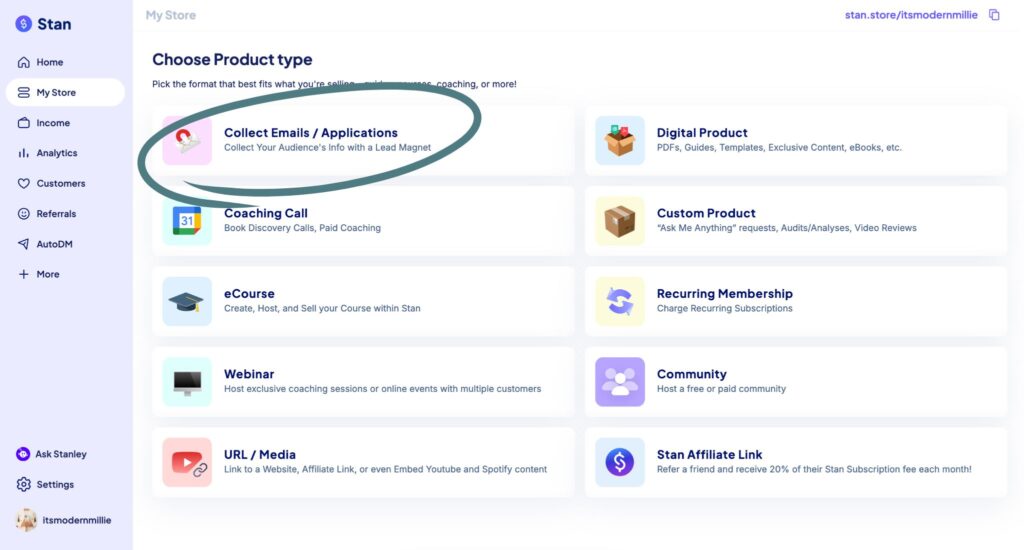
Add your title, subtitle and button. Choose what you need to collect (name and email), change the thumbnail, add your PDF and click publish!
After you have your freebie, it’s time to create your paid offer.
Step 3: Create Your Paid Offer
In the study that Stan did, they found that if you sell a $49 product, you’re actually 3.5 times more likely to make $100 in your first 30 days of selling. So, that’s what we’re going to create today.
Here’s the next AI prompt that you’re going to use.
Picking your paid offer
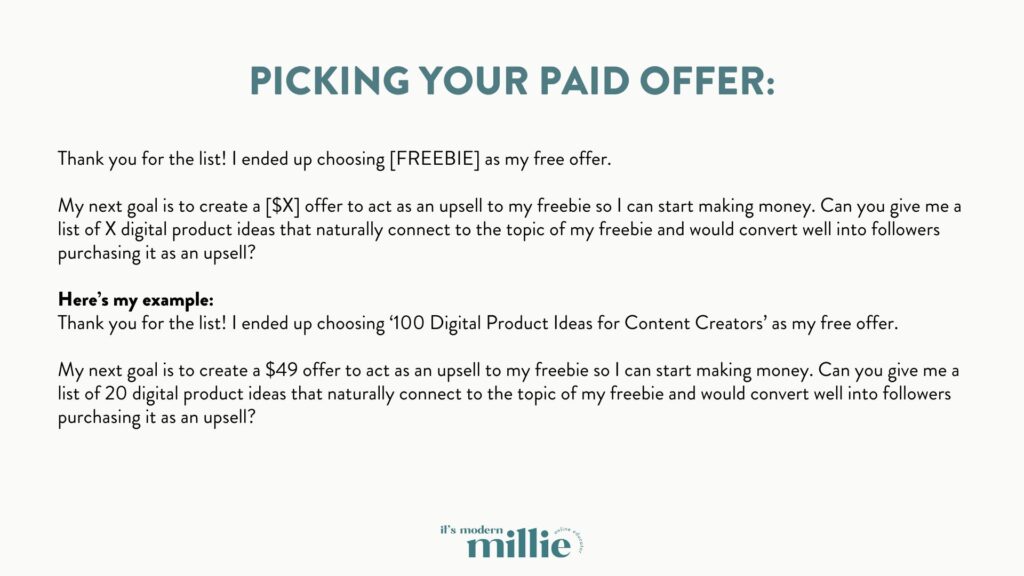
Trust me on this — ChatGPT will deliver. It can give you ideas for guides, e-books, templates, resources, and so many other types of offers you can create and eventually sell. And if you’re not getting the exact style of offer you want, simply adjust your prompt to ask for something more specific, like a checklist or even a mini course.
You can also choose a style of product that you know you have the bandwidth to create right now. Don’t choose a workshop or mini-course if your plate is full and you don’t have time to create those things. Instead, start with something a bit easier, like an e-book.
Whenever I create a new product like this, I always start in a Google Doc, just brainstorming everything I want to teach from A-Z. Once I have all of the information and I feel like it’s worth selling, I will head back over to Canva to find an e-book template for the design.
Once you have the product created, the steps within Stan are pretty much the same. Download it as a PDF, open Stan, create a new product and this time choose ‘Digital Product’. This time, you’re going to have a checkout page option.

Now, technically you could stop here and you would probably get some sales… but some sales aren’t good enough for me. I want this product to help you earn 5- or even 6-figures from your Instagram link in bio. So, we’re going to move onto step four.
Step 4: Create Your Email Sequence
Your email sequence is basically a few automated emails that will be sent to anyone who downloads your freebie. By the end of this sequence, you’ll pitch them your paid offer. The idea is to keep giving your audience valuable free content, so when it comes time to buy something from you, it’s a no-brainer.
And here’s the exciting part, email sequences work. In this video, I shared how I once thought email lists were dead… until I made $5,000 in just 8 days. And the best part? Only 200 people went through that sequence. So you don’t need a massive audience to see real results.
Now, let’s set up your email sequence.
You already know we have another prompt that’s going to help make this easier! This guide is all about working smarter, not harder.
Writing your email funnel


Let me know in the comments if you like these AI prompts. Are you interested in seeing more AI prompts that could help you as a content creator? Let me know!
Now, we need to set up this email funnel in Stan.
The freebie that you created, already has a delivery email. When you go into that digital download in Stan, there will be the option for ‘Email Flows’ or ‘Confirmation Email’. For these three emails, you’re going to choose ‘Email Flows’. Simply follow the steps within Stan to add your email flow to this product.

Always make sure to customize these emails – we want them to sound like YOU (not a robot) and ChatGPT has some seriously recognizable chat patterns, so just make sure that what you’re sending to your audience sounds like you.
On the final email, you can add your product link within the email, from Stan which makes checking out for your audience so simple. People can purchase directly from this email.
Now again, you can stop here but I am not done yet. Let’s increase your sales even more by setting up two DM automations.
Step 5: Set up two DM automations
I was pretty nervous to start using DM automations, but they have been a gamechanger for my business.
DM Automations are similar to email automation, but they’re prompted by someone commenting a phrase on an Instagram post. So, when you make a post on Instagram, you can include a simple call to action, something like “Comment 100Ideas” down below. That comment will automatically trigger a DM that shares your product or course info.
And because we’re using Stan, we can set up DM Automations within our account. Again, there’s no need to pay for a separate tool. Stan makes it super simple to integrate DM automations into your strategy.
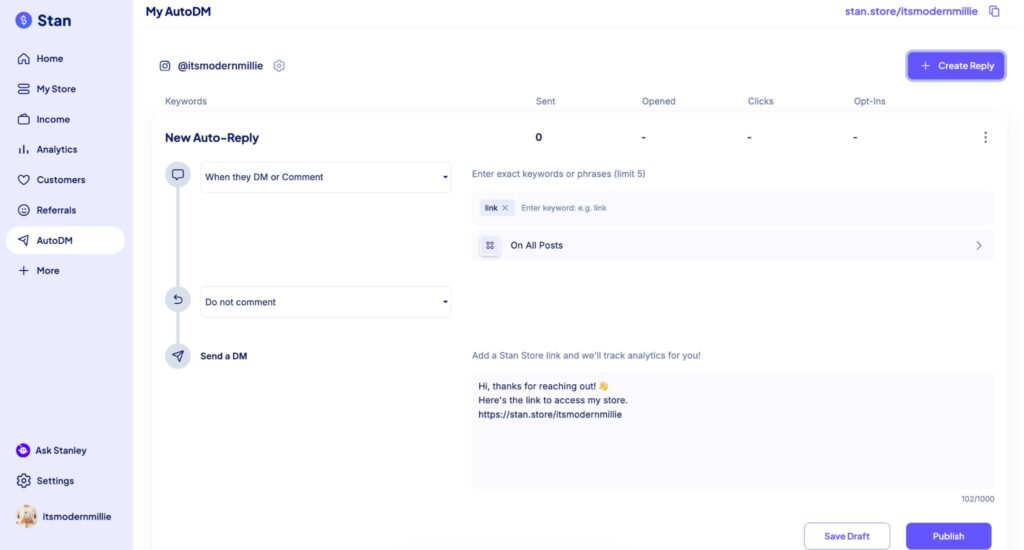
Now, the two automations that we’re going to create today are for the freebie and the paid product.
Head back over to Stan and click on the option for AutoDM.
Make sure that your freebie is the very first thing in your Instagram link in bio. It should be the very first thing that they are going to see, because with this first AutoDM, you’re going to be sending people your StanStore link.
The second AutoDM is going to take people directly to your product.
Now you can create content that encourages your audience to comment on those prompts for both your freebie and paid product. The AutoDM will automatically send them the links for you, so that you can make money even when you’re offline.
Step 6: Add CTA to Your Bio
Next, add a clear Call to Action (CTA) to your Instagram bio. Use your Stan Store as your Instagram link in bio, and include text that directs people to download your freebie. Here’s an example ⤵️

Always lead with your freebie first — this helps you build trust with your audience while your systems are already set up to handle the upsell. You don’t need to push sales manually; it works for you automatically.
And the final step to help you make 5-figures with this Instagram link in bio strategy? Create just one video a week to promote one of the automations you’ve set up.
Step 7: Create one video a week with one of the automations
Consistency is what turns clicks into real income.
My goal with all of my content is to offer tangle outcomes with actionable steps that you can take TODAY. I am always creating free content for my audience, but once per week I will share a video or carousel that leads people to my AutoDMs.
Now, if you want to keep making money as a content creator, I recommend reading this post next because it’s going to help you start affiliate marketing on Instagram. And don’t forget to download my AI Prompts from this post so you can copy and paste them into ChatGPT.
I’ll see you in the next one! Follow your joy.



Be the first to comment